Building a Native SQL Client from Scratch with Claude Code

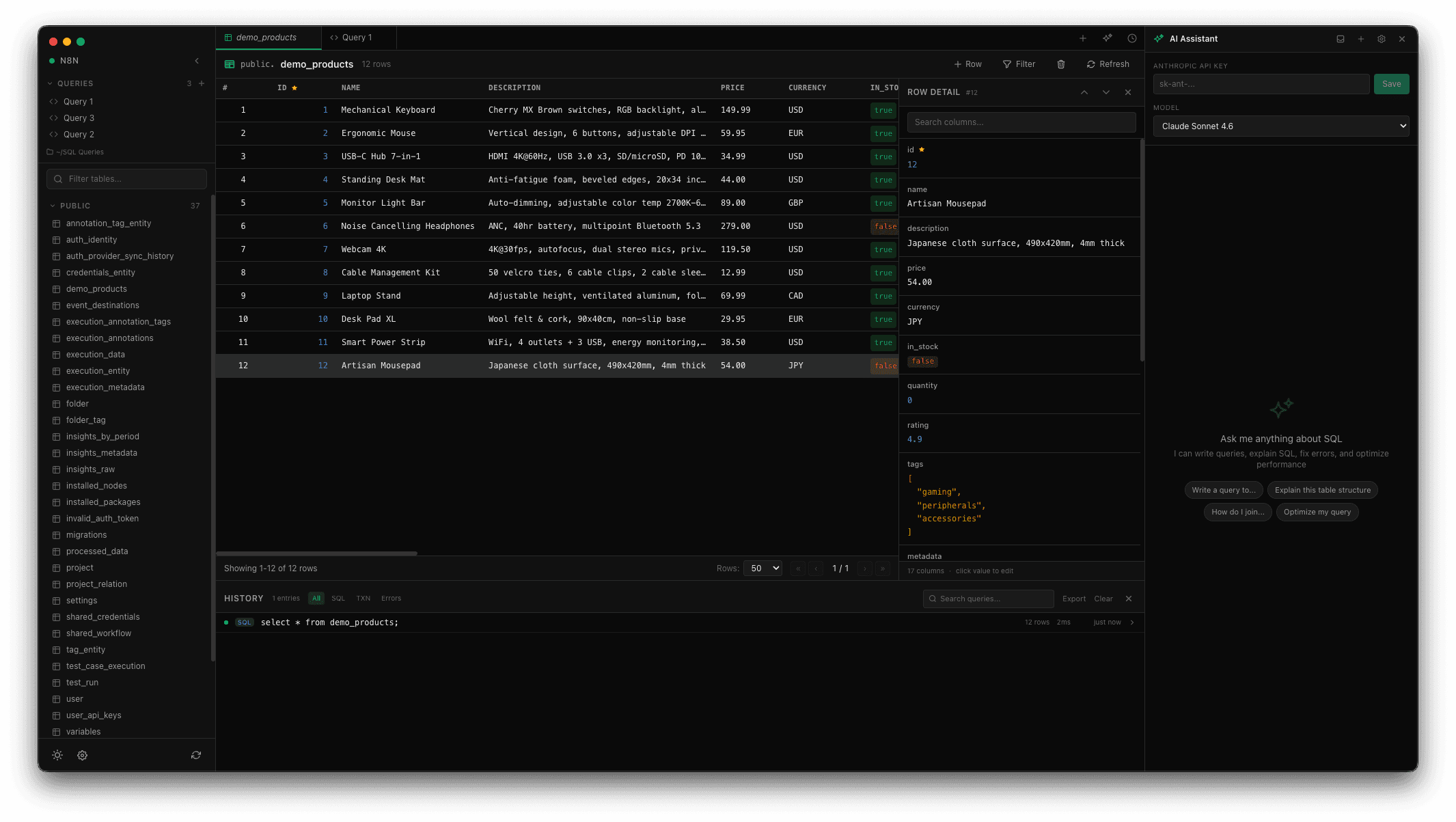
How I built a fully-featured PostgreSQL client in 48 hours using Electron, Svelte 5, and Claude Code — with inline editing, an AI assistant, and security hardening for open source release.
Building a Native SQL Client from Scratch with Claude Code
Published on March 10, 2026 • 10 min read
What started as a weekend project turned into a fully-featured PostgreSQL client in under 48 hours. Here's how I built SQL Client — a native macOS app with inline editing, an AI assistant, and all the features I actually wanted in a database tool — using Claude Code as my pair programmer.
The Motivation
I've been using various SQL clients over the years — pgAdmin, DBeaver, TablePlus, Postico. Each one does certain things well but none felt quite right. I wanted something fast, native-feeling, with a good editor, and ideally with AI built in so I could ask questions about my schema without switching contexts.
So I decided to build my own.
The Tech Stack
After some deliberation, I landed on:
- Electron for the desktop shell — cross-platform potential, though I'm focused on macOS for now
- Svelte 5 for the UI — reactive, fast, and the new runes system is genuinely pleasant to work with
- CodeMirror 6 for the query editor — proper SQL autocomplete, syntax highlighting, the works
- Tailwind CSS 4 for styling — dark theme by default, because we're not animals
- Postgres.js as the database driver — lightweight, fast, and TypeScript-native
- Anthropic SDK for the AI assistant — Claude integration for query help
Day 1: Core Foundation
The first session focused on getting the fundamentals right. Claude Code helped scaffold the Electron + Svelte + Vite setup, which can be fiddly with all the preload script configuration and IPC wiring.
Connection Manager
The connection manager supports multiple saved connections, each with a color indicator so you can visually distinguish between your local dev database and production at a glance. Connections are persisted to the user's app data directory.
Query Editor
CodeMirror 6 provides the editing experience. It's configured with:
- PostgreSQL-specific SQL autocomplete that's aware of your schema (table names, column names)
- Syntax highlighting tuned for PostgreSQL keywords
- SQL formatting via
sql-formattertriggered with Cmd+Shift+F - Auto-save with debouncing so your work is never lost
Data Grid
The results grid supports pagination (25, 50, 100, 500 rows), column sorting, and row selection with a detail sidebar. This was one of the more complex pieces — getting smooth scrolling and responsive column widths right took several iterations.
Day 2: The Features That Make It Useful
Inline Editing
This is the feature I'm most proud of. When you run a SELECT query on a table with a primary key, you can click any cell and edit it directly. The app tracks your changes, shows a diff indicator, and lets you commit everything with Cmd+S. It even supports a dedicated JSON/JSONB modal editor with validation and prettify.
For each edit operation, the app captures undo data — so if you accidentally update or delete rows, you can roll it back without reaching for the command line.
Multi-Tab Interface
Like any good editor, you can have multiple tabs open. Each query is backed by a .sql file stored in a configurable directory (defaults to ~/SQL Queries). There are also table preview tabs and schema inspection tabs. Standard shortcuts work: Cmd+N for new, Cmd+W to close, Cmd+1-9 to switch.
Schema Browser
The left sidebar shows all tables grouped by schema, with search. Right-clicking a table gives you options to view data, inspect the schema, or generate a SELECT query. It also shows foreign key relationships, which is useful when navigating unfamiliar databases.
AI Assistant
The right sidebar houses a Claude-powered AI assistant. It knows your current database schema and can:
- Explain complex queries in plain English
- Fix SQL errors (there's a "Fix with AI" button that appears on query failures)
- Generate queries from natural language descriptions
- Suggest optimizations and indexes
The AI responses render with full markdown support, and SQL code blocks have a "Run" button that executes the suggestion directly. Conversations are persisted so you can reference previous interactions.
Query History
Every query you execute is logged with its duration, status, and affected row count. The history drawer (Cmd+Shift+H) lets you search through past queries, filter by type (manual, transaction, error), and re-execute with one click.
Security Hardening
Before making the repository public, I did a thorough security review. Some of the key hardening measures:
- Path traversal protection — All file operations validate that paths stay within the queries directory
- Encrypted credentials — Database passwords are encrypted at rest using Electron's
safeStorageAPI (OS-level keychain) - Content Security Policy — Strict CSP headers prevent XSS attacks
- DOMPurify — AI-generated markdown is sanitized before rendering
- URL validation — External link handling only allows
http:andhttps:protocols - No insecure fallbacks — The API key storage refuses to fall back to base64 encoding when encryption is unavailable
The Claude Code Experience
This project was built almost entirely through pair programming with Claude Code. A few observations:
What worked well:
- Scaffolding and boilerplate — Claude handled the Electron IPC wiring, preload scripts, and Svelte store setup without much guidance
- Complex UI components — The data grid with inline editing, context menus, and keyboard navigation came together faster than I expected
- Security review — Claude identified path traversal vulnerabilities and other issues I would have missed
- Iterative refinement — "Make the JSON editor use CodeMirror instead of a textarea" is the kind of instruction that just works
What needed human judgment:
- Architecture decisions — Which state goes in Svelte stores vs. the main process
- UX decisions — When to use a modal vs. inline editing, sidebar widths, keyboard shortcut choices
- Prioritization — What to build next, what to cut
The Co-Authored-By attribution in git commits is transparent and increasingly standard in the open source community.
Try It
SQL Client is open source under the MIT license. You can download the macOS DMG from the GitHub releases page or build it from source:
1git clone https://github.com/lyubo-velikov/sql-client.git2cd sql-client3bun install4bun run dev
The release build is available at github.com/lyubo-velikov/sql-client/releases.
Currently tested with PostgreSQL on macOS. Other databases and platforms may work but aren't officially supported yet.
What's Next
Some features I'm considering:
- Multiple database support — MySQL, SQLite, and maybe MongoDB
- Query bookmarks and snippets — Beyond file-based saved queries
- Export — CSV, JSON, and Excel export from query results
- Linux and Windows builds — The Electron foundation is there, just needs testing
If you find it useful, star the repo or open an issue. Contributions welcome.
SQL Client is available on GitHub. Built with Electron, Svelte 5, CodeMirror 6, and Claude.
Related Posts
AI Morning Briefing — October 6th, 2026
Reflection's Beam 501B open-weight MoE, Opus 5.5 agents hunt magnetic semiconductors, Cloudflare Web Search API, and a Claude diary report that led to a felony charge.
AI Morning Briefing — October 4th, 2026
OpenAI launches always-on dots agents, Aleph Alpha's open Kolibri model, Opus 5.5's price cut, and the case for default hard budget caps.
AI Morning Briefing — October 1st, 2026
Google ships Gemini 4 Argon with a 1M-token output limit, GPT-6 Sol pricing pressure, mathematicians' rules for AI-generated proofs, and new open Qwen3.8 variants.